There's an old story that goes something like this:
Little Timmy is very late to school one morning. It's 10:30, and the teacher looks out the classroom window and sees Timmy just getting into the schoolyard. He's pushing his bicycle and looks very hot and out of breath. When he gets into the classroom, the teacher says:
"Timmy, why are you so late to school?"
Timmy replies, "Sorry teacher, I had to push my bicycle all the way here."
The teacher, confused, says, "Why didn't you ride your bicycle?"
Timmy replies, "Teacher, I was running so late this morning that I didn't have time to get on the bike."
I hear this kind argument all the time when people put off automating. "I have too much to do," they say. "When this release settles down, I'll have time then."
Bullshit.
Folks, I hate to say it like this, but you're never going to have that perfect moment where you do nothing but automate. If you're a tester, then there's always something that will need testing. You have to find ways to work automation development in to your regular day. If automation is something that you throw to the back burner every time your workload heats up, you'll never get any benefits from automation.
Sometimes this means explaining to your manager that automation can't be a side project and should be focused on sooner rather than later. Sometimes it means recruiting a developer to help get you jumpstarted, so you can get a test framework built up quicker. Sometimes it means hiring another person whose primary responsibility will be test automation.
Point is, if you're always waiting for that perfect moment, you'll never get anything automated. So do *something*. Even if it's just a small test to start with, that's something you can build on. You won't get a comprehensive set of automated tests overnight; so get one test automated/one helpful tool written and then add to that. Even if you only automate one new test a week, over the course of a month, that's 4 tests you don't have to run by hand. Or, if you're trying to build a tool that will augment manual testing, get that to your testers as soon as it can do something useful, then continue adding features. The time savings will get more and more significant as you go along.
So, long story short, just get on the bike!
Thursday, May 27, 2010

Monday, May 10, 2010
TUU: The Missing Metric
Before taking the plunge into test automation, many managers want to know how long until they see an ROI (return on investment). In the case of a commercial tool, some vendors will actually send out an Excel spreadsheet with formulas that let you plug in the amount you pay a tester per hour, and then the spreadsheet calculates how much it costs to find that bug during the test phase vs how much it costs to find it once the app has gone to the customer.
While I certainly understand the need to justify an expense, I think ROI by itself is the wrong way to look at test automation, because it puts the focus on dollars rather than on utility. If you buy a $9,000 automation tool, and pay your tester $40/hour, then using the ROI approach, your test automation tool needs to run 225 hours' worth of tests before your see an ROI. If you've bought multiple copies of that tool, then you need to multiply both the total cost and the total number of hours by the number of copies you purchased. So if you bought 5 copies of the test tool, that's $45,000 you spent, and you need to run 1,125 hours' worth of tests to break even. "That's too much time or money", someone says. "Look at a cheaper tool."
What I don't see people consider is how long it will take before the automation is doing something productive. So let's say that you're considering spending money on a commercial tool. Instead of saying "How long until I see an ROI", ask "How long until this lets me do something else?" Automation is implemented so that you don't have to do the same tasks over and over; you automate to get the computer doing regression tests so you can focus on other test activities. How long will it take you to create that first smoke test? How long until you are freed up to do the new tests? Let's say it takes you 2 work days to get your smoke test up and running. That means that two days after implementing automation, you start getting some of your time back. That's how long until the automation is doing something useful. I call this Time Until Useful (TUU).
I think that 16 hours until your automation is doing something useful is a lot more pallatable than 1,125 hours until your automation justifies its existence. Plus, now you're working and finding bugs that you didn't have time to find before. I've never seen that time savings or "new-bugs-found-during-exploratory-testing-while-the-automation-runs-a-smoketest" line item included on an ROI sheet.
If you're considering open source tools, TUU is much more a natural metric. Freed from cost concerns, a test team is given the chance to look at a bunch of tools and pick the one that's going to let them get the most done the fastest. I've seen teams where managers say 'oh, you're going open source?' and then promptly go deaf because they think that since there's no cost involved, they don't need to justify any expenses, therefore they don't care. Thing is, open source tools will have a bit of a learning curve as well, and you want to make sure that your team selects one that meets their needs and still has a good TUU. If the tool is free, but it takes 2 months before it's doing anything of value, is that worthwhile? No, you'd want them to look at a different open source tool that's going to do something sooner than that.
TUU is a metric that should be considered with the same weight (or maybe with greater weight) as ROI. Whether you're going commercial or open source, you should always consider how long it will be until the automation is doing something useful.
While I certainly understand the need to justify an expense, I think ROI by itself is the wrong way to look at test automation, because it puts the focus on dollars rather than on utility. If you buy a $9,000 automation tool, and pay your tester $40/hour, then using the ROI approach, your test automation tool needs to run 225 hours' worth of tests before your see an ROI. If you've bought multiple copies of that tool, then you need to multiply both the total cost and the total number of hours by the number of copies you purchased. So if you bought 5 copies of the test tool, that's $45,000 you spent, and you need to run 1,125 hours' worth of tests to break even. "That's too much time or money", someone says. "Look at a cheaper tool."
What I don't see people consider is how long it will take before the automation is doing something productive. So let's say that you're considering spending money on a commercial tool. Instead of saying "How long until I see an ROI", ask "How long until this lets me do something else?" Automation is implemented so that you don't have to do the same tasks over and over; you automate to get the computer doing regression tests so you can focus on other test activities. How long will it take you to create that first smoke test? How long until you are freed up to do the new tests? Let's say it takes you 2 work days to get your smoke test up and running. That means that two days after implementing automation, you start getting some of your time back. That's how long until the automation is doing something useful. I call this Time Until Useful (TUU).
I think that 16 hours until your automation is doing something useful is a lot more pallatable than 1,125 hours until your automation justifies its existence. Plus, now you're working and finding bugs that you didn't have time to find before. I've never seen that time savings or "new-bugs-found-during-exploratory-testing-while-the-automation-runs-a-smoketest" line item included on an ROI sheet.
If you're considering open source tools, TUU is much more a natural metric. Freed from cost concerns, a test team is given the chance to look at a bunch of tools and pick the one that's going to let them get the most done the fastest. I've seen teams where managers say 'oh, you're going open source?' and then promptly go deaf because they think that since there's no cost involved, they don't need to justify any expenses, therefore they don't care. Thing is, open source tools will have a bit of a learning curve as well, and you want to make sure that your team selects one that meets their needs and still has a good TUU. If the tool is free, but it takes 2 months before it's doing anything of value, is that worthwhile? No, you'd want them to look at a different open source tool that's going to do something sooner than that.
TUU is a metric that should be considered with the same weight (or maybe with greater weight) as ROI. Whether you're going commercial or open source, you should always consider how long it will be until the automation is doing something useful.
Friday, May 7, 2010
String Generator
If you've ever had to do boundary testing, you probably did what my co-workers and I used to do. You need a 400 character string, so you open MS Word, hold down the 'x' key for a few seconds, and then use the word count feature to see how many characters you've got. If you've got too many, you delete some. If you don't have enough, you mash 'x' for a few more seconds. Later, rinse and repeat until you've got it right.
Some folks would even remember to save those word files for future use, but more often than not we closed them without thinking about it. (This was usually followed by the comment "Ah, crap, I shoulda saved that...")
To help take some of the sting out of this, I wrote a string generator application. It lets users generate strings of predefined lengths, and then automatically puts those strings on the clipboard so that they can be pasted into fields.
I wanted an easy way to know that a field could accept that number of characters, so I always had the string end with a capital Z. For example, if you needed a 10 character string, it would generate aaaaaaaaaZ. Then you'd paste that into the desired field, and if you didn't see the 'Z', you knew the field was truncating the data that was entered.
The app I wrote looked like this:

Each of the buttons you see on the left would automatically generate a string of the specified length. If you needed a string of a different length, you could enter that length in the box next to the custom button.
The string generation itself was handled by this code:
Each button on the form had code like this:
And here's the code for the custom button:
Feel free to take this code and build your own string generator. (If the source code got truncated in the post, just go to View Source in your browser and you can copy and paste from there)
Enjoy!
Some folks would even remember to save those word files for future use, but more often than not we closed them without thinking about it. (This was usually followed by the comment "Ah, crap, I shoulda saved that...")
To help take some of the sting out of this, I wrote a string generator application. It lets users generate strings of predefined lengths, and then automatically puts those strings on the clipboard so that they can be pasted into fields.
I wanted an easy way to know that a field could accept that number of characters, so I always had the string end with a capital Z. For example, if you needed a 10 character string, it would generate aaaaaaaaaZ. Then you'd paste that into the desired field, and if you didn't see the 'Z', you knew the field was truncating the data that was entered.
The app I wrote looked like this:

Each of the buttons you see on the left would automatically generate a string of the specified length. If you needed a string of a different length, you could enter that length in the box next to the custom button.
The string generation itself was handled by this code:
private string prgGenerateString(int intLen)
 {
  StringBuilder MyStringBuilder = new StringBuilder();
  MyStringBuilder.Capacity = intLen;
  for (int i = 1;i<intlen;i++)
  {
      MyStringBuilder.Append("a");
  }
  MyStringBuilder.Append("Z");
  return MyStringBuilder.ToString();
 }

private void prgGenerateStatusMessage(int intLen)
 {
  lblStatus.Text = intLen.ToString() + " character string placed on clipboard.";
 }

private void prgCreateStringAndPost(int intLen)
 {
  try
  {
   string txtValue = prgGenerateString(intLen);
   txtPreview.Text = txtValue;
   prgGenerateStatusMessage(intLen);
   Clipboard.SetDataObject(txtValue);
  }
  catch(Exception except)
  {
   lblStatus.Text = except.Message;
  }
 }
Each button on the form had code like this:
  private void cmd129_Click(object sender, System.EventArgs e)
  {
      prgCreateStringAndPost(129);
  }
And here's the code for the custom button:
  private void cmdCustom_Click(object sender, System.EventArgs e)
  {
      if (txtCustomLength.Text != "")
      {
          try
          {
              int val = Convert.ToInt32(txtCustomLength.Text);
              prgCreateStringAndPost(val);
          }

          catch (Exception except)
          {
              lblStatus.Text = except.Message;
          }
      }

      else
          MessageBox.Show("Please enter a value in the box next to the Custom button");
  }
Feel free to take this code and build your own string generator. (If the source code got truncated in the post, just go to View Source in your browser and you can copy and paste from there)
Enjoy!
Friday, April 30, 2010
Time Diffs
During one cycle of performance testing, the tool I was using only logged a test's start and end time. For some reason, it didn't log duration. So you'd see start time 10:34:23 and end time 10:39:00. Now, in the case of a short test, say, one that ran in 15 or 20 mins, that wasn't a big deal, it's easy to do that kind of math in your head. But when the durations were like this: start time 10:32:23 and the end time was 13:18:54, it would take a minute or so for me to calculate how long that was.
This was a frustrating experience, and one that was prone to human error. So I wrote a little C# app that allowed me to enter two times and see the difference between them. This let me note the test durations much faster and more precisely. To build your own time diff tool, fire up Visual Studio and create a form that looks like this:
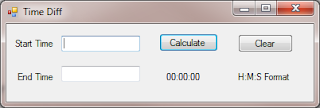
For reference, I named the Start Time field txtStart, the End time field txtStop, the Calculate button is cmdCalculate, and the Clear button is cmdClear. I was lazy and left the label that you see as 00:00:00 as label1.
Now, use the following code for the calculate button:
Here's the code for the Clear button:
And that's it. You now have a little app that will calculate the differences in time for you. One thing to note here is that the app isn't intended to diff times that are greater than 24 hours, and you have to enter the times in a 24 hour clock format. So if your test ended at 2 pm, you'd enter 14:00:00.
This is a nice example of creating a tool that augments manual testing. It doesn't do any testing on its own, but it does let a tester perform a given activity faster and more efficiently. Always be looking for little opportunities like this, and your testers will thank you for them.
This was a frustrating experience, and one that was prone to human error. So I wrote a little C# app that allowed me to enter two times and see the difference between them. This let me note the test durations much faster and more precisely. To build your own time diff tool, fire up Visual Studio and create a form that looks like this:

For reference, I named the Start Time field txtStart, the End time field txtStop, the Calculate button is cmdCalculate, and the Clear button is cmdClear. I was lazy and left the label that you see as 00:00:00 as label1.
Now, use the following code for the calculate button:
private void cmdCalculate_Click(object sender, EventArgs e)
      {
          if ((txtStart.Text != "") && (txtStop.Text!=""))
          {
          DateTime start = DateTime.Parse(txtStart.Text);
          DateTime stop = DateTime.Parse(txtStop.Text);
          TimeSpan duration = new TimeSpan();
          duration = stop - start;
          label1.Text = duration.ToString();
          }
      }
Here's the code for the Clear button:
private void cmdClear_Click(object sender, EventArgs e)
      {
          txtStart.Text = "";
          txtStop.Text = "";
          label1.Text = "00:00:00";
      }
And that's it. You now have a little app that will calculate the differences in time for you. One thing to note here is that the app isn't intended to diff times that are greater than 24 hours, and you have to enter the times in a 24 hour clock format. So if your test ended at 2 pm, you'd enter 14:00:00.
This is a nice example of creating a tool that augments manual testing. It doesn't do any testing on its own, but it does let a tester perform a given activity faster and more efficiently. Always be looking for little opportunities like this, and your testers will thank you for them.
Wednesday, April 28, 2010
Focus on Test Approach, Not Test Tools
There's a lot of news flying around right now about how powerpoint is making us stupid. Thing is, I don't think this is a powerpoint problem, I think it's a people problem. Slides probably aren't the best method to communicate this information, and that certainly needs to be remedied. So it's the approach that these presenters are taking that's the problem, not powerpoint itself.
This got me thinking about some of the negativity that comes up when the honeymoon period with a test automation tool ends. I've seen teams whose intent/dream/goal was to create UI automation tests via a record and playback tool. They envisioned doing a single recording and all their tests would then be able to run at the push of a button.
It's a nice dream, but in order to really get the most out of your automation efforts, you really need to know what you're doing. It's impossible to automate all your tests, and quite frankly, you probably don't need to. I once worked for a manager who insisted that all bugs have an automated regression test for them. Think about that for a minute. All bugs. Every one of them. Even the ones that were citing spelling mistakes.
Needless to say, that wasn't a good use of my time, and I'm pretty sure my blood pressure was in the near fatal range for a while there.
When you're thinking about automation, think about what makes the most sense to automate. Smoke test? Yep. Get that going and integrate it with your build process. Regression test? Yep, but don't go crazy. Focus on the primary workflows of your application, don't try to automate a test for every bug you've ever logged. That whizbang new functionality that Sally just rolled into the build? Probably not.
That whizbang new functionality probably should not be automated yet because it's UI will change, and most likely will change a lot over the course of the release cycle. Instead, use automation to augment manual and exploratory testing for this feature. Let's say that Sally's piece is a report generator that pulls data from a database. Build some automation that sets up different data in the db, allowing you to test more types of her reports more quickly. Maybe you can set up a batch file that calls out to a diff tool and compares a report from today's build to a baseline.
The approach you take will largely determine your automation effort's success. Don't assume that just because you bought a record-and-playback tool that you've got test automation covered. The test tool is a dumb computer program; you're the one with the brain. Know when to employ the tools you have, when to use something else, and your testing will go much smoother.
This got me thinking about some of the negativity that comes up when the honeymoon period with a test automation tool ends. I've seen teams whose intent/dream/goal was to create UI automation tests via a record and playback tool. They envisioned doing a single recording and all their tests would then be able to run at the push of a button.
It's a nice dream, but in order to really get the most out of your automation efforts, you really need to know what you're doing. It's impossible to automate all your tests, and quite frankly, you probably don't need to. I once worked for a manager who insisted that all bugs have an automated regression test for them. Think about that for a minute. All bugs. Every one of them. Even the ones that were citing spelling mistakes.
Needless to say, that wasn't a good use of my time, and I'm pretty sure my blood pressure was in the near fatal range for a while there.
When you're thinking about automation, think about what makes the most sense to automate. Smoke test? Yep. Get that going and integrate it with your build process. Regression test? Yep, but don't go crazy. Focus on the primary workflows of your application, don't try to automate a test for every bug you've ever logged. That whizbang new functionality that Sally just rolled into the build? Probably not.
That whizbang new functionality probably should not be automated yet because it's UI will change, and most likely will change a lot over the course of the release cycle. Instead, use automation to augment manual and exploratory testing for this feature. Let's say that Sally's piece is a report generator that pulls data from a database. Build some automation that sets up different data in the db, allowing you to test more types of her reports more quickly. Maybe you can set up a batch file that calls out to a diff tool and compares a report from today's build to a baseline.
The approach you take will largely determine your automation effort's success. Don't assume that just because you bought a record-and-playback tool that you've got test automation covered. The test tool is a dumb computer program; you're the one with the brain. Know when to employ the tools you have, when to use something else, and your testing will go much smoother.
Friday, April 9, 2010
What's in it for me?
As a presenter, that's the question you always have to be asking yourself. Imagine yourself in your audience's position - you are taking time out of your busy workday to view a demonstration. As such, you want to know how this new product or service will benefit you. When you first sit down to hear the presenter speak:
Yet it's amazing how many people start their presentations off with a bunch of slides that agonizingly detail those points. When I watch a demo, I want to know if a product is going to help me do my job effectively. Once I know that it will, then it might be nice to know more about the awards and company history. But that's not what's essential.
The essence of the demo should show the audience how your product will solve a problem they have. Before you present, make sure you understand the audience's pain. Are they performing a tedious task that is prone to errors? Are they trying to speed up their app's performance? Do they need a better way to communicate between mulitple departments?
Once you understand the problem, you can apply your product's features and show how those features turn into benefits for the audience. And that's the key - too many people will show a cool feature in their product, but not state how that feature benefits the audience. Always make sure you state the benefit - "Cool Feature X is important because it allows you to process your data 4x faster than before, which saves you a ton of time over the course of a release."
By tailoring your demos so you show how to solve your audience's problems, you'll be a much more effective presenter.
- You do not care about the presenter's company history.
- You do not care about the awards the presenter's company has won.
- You do not care about the demonstrated product's history.
Yet it's amazing how many people start their presentations off with a bunch of slides that agonizingly detail those points. When I watch a demo, I want to know if a product is going to help me do my job effectively. Once I know that it will, then it might be nice to know more about the awards and company history. But that's not what's essential.
The essence of the demo should show the audience how your product will solve a problem they have. Before you present, make sure you understand the audience's pain. Are they performing a tedious task that is prone to errors? Are they trying to speed up their app's performance? Do they need a better way to communicate between mulitple departments?
Once you understand the problem, you can apply your product's features and show how those features turn into benefits for the audience. And that's the key - too many people will show a cool feature in their product, but not state how that feature benefits the audience. Always make sure you state the benefit - "Cool Feature X is important because it allows you to process your data 4x faster than before, which saves you a ton of time over the course of a release."
By tailoring your demos so you show how to solve your audience's problems, you'll be a much more effective presenter.
Friday, March 26, 2010
The Power of the Mute Button
A big challenge any remote presenter faces is that it's too darned easy for an audience participant to tune out. You're already sitting in front of your computer, watching a demo, and then an important email shows up. Or an IM pops in. Or someone drops by your cube and wants to chat. So you start typing, or chatting, and if you haven't muted your phone line, that background noise is going to come through.
This is frustrating for the person presenting. Imagine if this scenario played out in a conference room. There, the presenter would politely ask to table the side discussion to later, or see if it was something he could help with. If it wasn't related to the item being presented, the people could step out of the room and not distract anyone. But when you're demoing remotely, this isn't an option. In that situation, you need to be able to mute the person remotely. If you can't, you're never going to get your message across.
Case in point:
A few months back, I attended a webinar that Microsoft was putting on about Visual Studio 2010. The presenter had to stop several times to ask people to mute their lines. Now here's the thing - if you're the person who's stopped paying attention to the call and is now typing, chatting, or playing video games, you're not going to notice the presenter asking people to mute. So he had to contend with a metric-crap ton of background noise. As an audience member, it was extremely frustrating to try and filter out the noise from the presenter's message, and to be honest, I can't remember much of what he talked about.
When I give remote demos, I have the ability to mute people remotely when stuff like this happens. The program I use (GoToMeeting) also has a chat window. So if there's a lot of background noise coming from a particular participant, I'll say "Ok, folks, it sounds like -insertPersonNameHere- has a really sensitive microphone that's picking up a lot of background noise. I'm going to mute them, but if they have questions, they'll be able to let me know via the chat window, and I'll unmute them."
So make sure you have the ability to mute people remotely. It will only make your presentations run smoother both for yourself, and for your audience.
This is frustrating for the person presenting. Imagine if this scenario played out in a conference room. There, the presenter would politely ask to table the side discussion to later, or see if it was something he could help with. If it wasn't related to the item being presented, the people could step out of the room and not distract anyone. But when you're demoing remotely, this isn't an option. In that situation, you need to be able to mute the person remotely. If you can't, you're never going to get your message across.
Case in point:
A few months back, I attended a webinar that Microsoft was putting on about Visual Studio 2010. The presenter had to stop several times to ask people to mute their lines. Now here's the thing - if you're the person who's stopped paying attention to the call and is now typing, chatting, or playing video games, you're not going to notice the presenter asking people to mute. So he had to contend with a metric-crap ton of background noise. As an audience member, it was extremely frustrating to try and filter out the noise from the presenter's message, and to be honest, I can't remember much of what he talked about.
When I give remote demos, I have the ability to mute people remotely when stuff like this happens. The program I use (GoToMeeting) also has a chat window. So if there's a lot of background noise coming from a particular participant, I'll say "Ok, folks, it sounds like -insertPersonNameHere- has a really sensitive microphone that's picking up a lot of background noise. I'm going to mute them, but if they have questions, they'll be able to let me know via the chat window, and I'll unmute them."
So make sure you have the ability to mute people remotely. It will only make your presentations run smoother both for yourself, and for your audience.
Subscribe to:
Posts (Atom)

 Posts
Posts

